Short answer: November 2026
To delete a Walter Writes AI account, message support in the in-app chat or email support@walterwrites.ai; Walter’s help article, updated September 12, 2025, offers no self-serve delete button. Deletion is permanent and forfeits remaining words. Cancel your plan first, including any Apple or Google subscription.
Key takeaways
- Support deletes the account for you after a chat or email request; my complete Walter Writes AI guide explains the plans and apps the account covers.
- Walter’s help center lists four results: data erased, subscription cancelled, remaining words lost with no refund, and no access to history.
- Deleting the account does not stop a charge billed by Apple or Google, and Google says uninstalling the app does not cancel either.
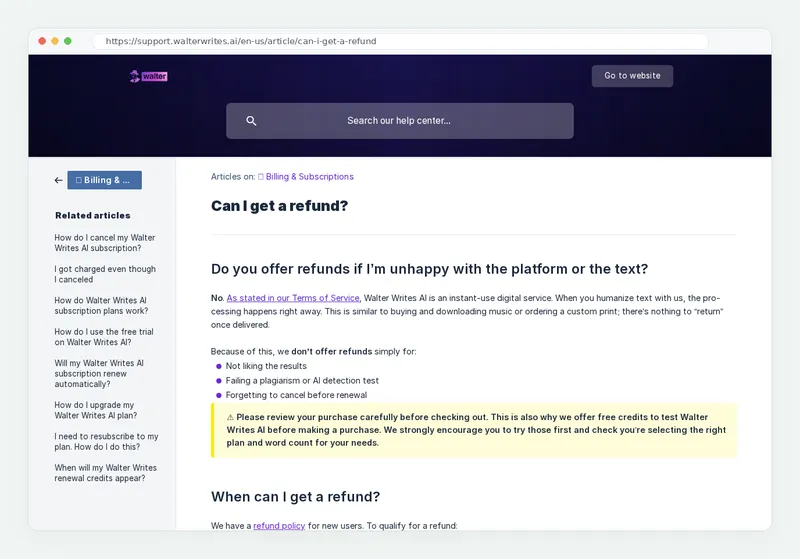
- If you want money back, ask first: refunds cover only a first-ever subscription, within 3 days, with 1,500 words used or fewer.
About this guide: how I checked
By Alex Morgan, an independent reviewer who has tested 40+ AI writing tools. Updated November 9, 2026. That day I opened Walter’s help article “How do I delete my Walter Writes AI account?” from the help center home, read the cancel and refund articles, Walter’s terms and privacy policy, and Apple’s and Google’s subscription help. The steps below follow those pages.
How do I delete my Walter Writes AI account?
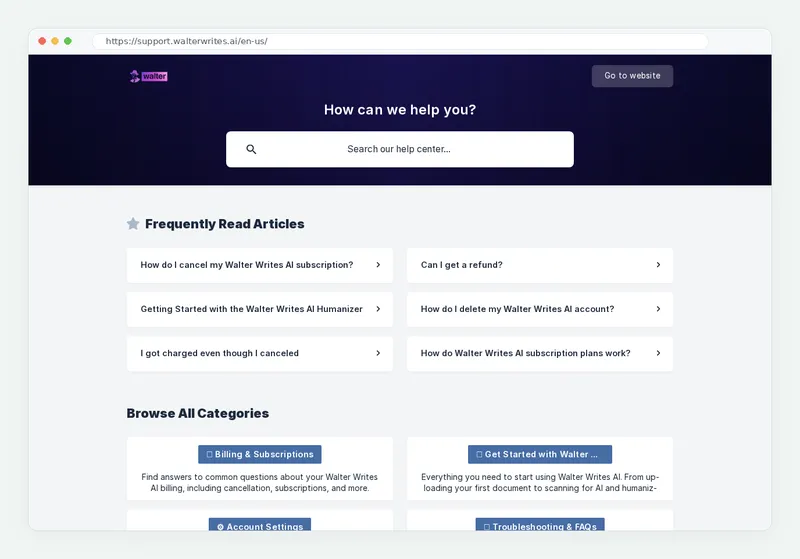
You ask Walter support to delete it. The official help center article says: “contact us via chat (from inside Walter Writes AI) or by email” at support@walterwrites.ai. There is no delete button in settings, so a request is the only route.
Do it in this order so you do not lose money or files on the way:
- Decide on a refund. If this is your first-ever subscription, bought within 3 days, with 1,500 words used or fewer, request the refund before anything else.
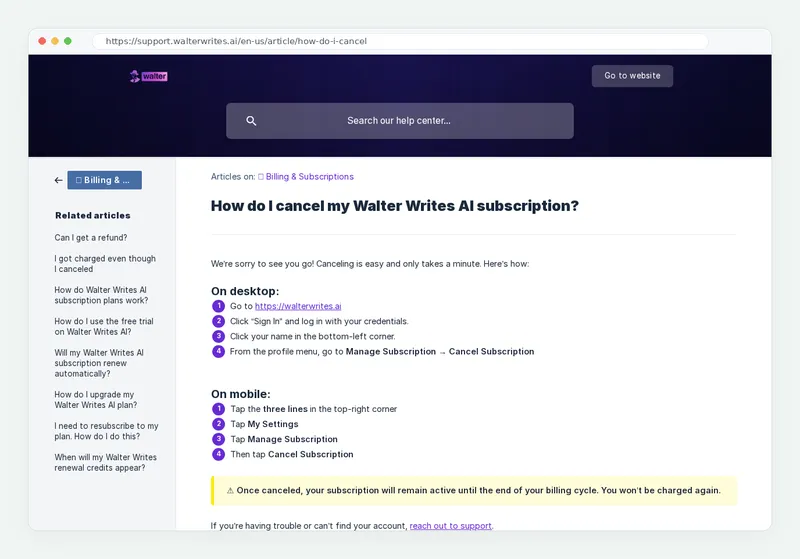
- Cancel the web subscription. Sign in, click your name at the bottom left, then Manage Subscription and Cancel Subscription.
- Cancel any app store subscription. If you paid inside the iPhone or Android app, cancel in Apple or Google settings.
- Copy what you want to keep. Save rewrites and detector results, because deleted history cannot be recovered.
- Send the deletion request. Use the in-app chat, or email support@walterwrites.ai from your account address with the template below.
- Keep the confirmation. Save support’s reply and check your next card statement.
If you cannot sign in to reach the chat, email works on its own; my Walter login help covers password resets if you want your history first.
Should I cancel my Walter Writes AI subscription before deleting the account?
Yes, cancel first. The help article says deletion cancels the subscription automatically, but cancelling yourself stops the next renewal at once, before anyone has read your request.
Timing matters because renewals are final. Walter’s terms of service, updated October 26, 2026, state “All subscription renewals are final and non-refundable.” The charged-after-cancelling article adds that cancelling after the charge date “doesn’t trigger a refund.”
On mobile, the cancel article uses the three-line menu, then My Settings, Manage Subscription and Cancel Subscription. My cancel guide shows each screen.
How do I cancel if I subscribed through the iPhone or Android app?
Cancel in Apple or Google settings, because Walter cannot stop a charge that Apple or Google bills. The App Store listing sells in-app plans such as Starter Monthly at USD 12, and Apple collects that payment.
This is where people get caught. One App Store review dated October 12, 2026, shown on MWM’s app profile, complains of being charged after the account was deleted. An Apple subscription keeps running until you cancel it with Apple.
iPhone: Apple Support, published September 29, 2026, says to open Settings, tap your name, tap Subscriptions, tap the subscription, then tap Cancel Subscription. If you see no Cancel button or an expiration message in red, it is already cancelled. You can also cancel at account.apple.com.
Android: Google Play Help says to open subscriptions in Google Play, select the subscription and tap Cancel subscription. It warns: “When you uninstall the app, your subscription won’t cancel.” My page on the Walter Writes AI app for iPhone and Android shows which listing is the official one.
What happens to my words, text and data when I delete my account?
Everything on the account goes, and it cannot come back. The help article lists four results:
- All your data is permanently erased.
- Your current subscription is cancelled automatically.
- Remaining words are lost and cannot be refunded or transferred.
- You lose access to all features and history.
If you return later, you start a new account, and the 300-word free trial is a one-time offer that “doesn’t renew.” The article itself suggests the gentler option: “If you only want to stop future charges but keep your data, you can cancel your subscription instead.”
On data, Walter’s privacy policy keeps personal information “for as long as necessary” to run the service and meet legal duties, such as billing records. Card details sit with a third-party payment processor, not with Walter. The Google Play data safety panel also says “You can request that data be deleted.”
Cancel vs delete vs refund: which one do you need?
Cancel to stop paying, ask for a refund to get money back on a new plan, and delete only when you want the account and its data gone for good.
Cancel subscription
Stops the next renewal. You keep your account, history and words until the paid term ends, and you can resubscribe later.
Delete account
Erases data, history and remaining words for good. Done by support after a chat or email request. Cannot be undone.
| Action | How to do it | What you keep | Money back? | Reversible? |
|---|---|---|---|---|
| Cancel subscription | Your name, then Manage Subscription, then Cancel Subscription | Account, plus access until the paid term ends | No, it only stops renewals | Yes, resubscribe any time |
| Delete account | In-app chat or email to support@walterwrites.ai | Nothing | No, remaining words are not refunded | No, deletion is permanent |
| Request refund | Email support with your account email and reason | Depends on what you ask for | Yes: first-ever subscription, within 3 days, 1,500 words or fewer | Not applicable |
| App store cancel | Apple Settings or Google Play subscriptions | Access until the store period ends | Under Apple or Google refund rules | Yes, resubscribe in the store |
The refund article says support replies within 2 business days and that disliking results or forgetting to cancel does not qualify. My page on the Walter refund policy explained walks through each condition.
If you are leaving because of price or results rather than privacy, compare Grubby AI vs Walter Writes AI or the Walter alternatives first; cancelling keeps your account in place while you decide.
Email template to request Walter Writes AI account deletion
Send this from the email address on your account so support can match it without extra checks. Fill in the square brackets and send it to support@walterwrites.ai.
Subject: Account deletion request
Hello Walter Writes AI support,
Please permanently delete my Walter Writes AI account and the personal data linked to it.
Account email: [your account email]
Plan: [Free trial, Starter, Pro, Elite or Teams]
Billing: I cancelled on the website on [date] / I cancelled my [Apple or Google] subscription on [date].
I understand deletion is permanent and remaining words will be lost. Please confirm by email once the account and data are deleted.
Thank you,
[Your name]
Main limitation: Walter offers no self-serve delete button, so the timing depends on a support reply. On Trustpilot, checked November 9, 2026, the company “typically replies within 24 hours.” If you also want a refund, send that request first, in a separate message.
Can I make a data deletion request under the Walter Writes AI privacy policy?
Yes. The privacy policy lets you ask to review, update or delete your personal data through the request form on the Walter support page. Residents of the European Economic Area can also email Walter Writes AI legal, as the policy describes.
For most people, the chat or support@walterwrites.ai route is faster and does the same job. Use the privacy form when you want a formal record that you used a data right. If the app will not load while you try to reach chat, see how to fix Walter Writes AI when it is not working; email still works meanwhile.
My method and sources for these deletion steps
On November 9, 2026 I opened the help article “How do I delete my Walter Writes AI account?” from the help center home, which shows it among the frequently read articles. I then read Walter’s cancel, refund and charged-after-cancelling articles, the terms (updated October 26, 2026), the privacy policy, and the Apple and Google subscription pages.
Limits: these steps follow the help center’s written process, and reply times come from Trustpilot’s published figure. Revision log: 2026-11-09, steps checked against the live help article and app store billing added. If you are unsure whether to leave at all, read whether Walter Writes AI is safe to pay for or my explainer on what Walter Writes AI is and how it works.
Frequently asked questions
How do I delete my Walter AI account?
Can I delete my Walter Writes AI account myself?
Does deleting my account cancel my subscription?
Will I get a refund for unused words if I delete my account?
Can I recover a deleted Walter Writes AI account?
Does uninstalling the Walter Writes AI app delete my account?
Is Walter Writes AI legit?
Try Walter Writes AI again any time with a new account, or keep your current one and change plans instead of deleting.